Hotmail Inbox
 The Windows Live Hotmail Inbox is the most central folder: all emails not flagged as spam (junk mail) are automatically delivered inside the Inbox. The only exception can come from filters you might have setup in your Hotmail account. The Inbox is the folder you most commonly use in Hotmail, since it contains all your mail. This tutorial covers the Hotmail Inbox in details. Like other Hotmail folders, the Hotmail Inbox label is in bold font if it contains any new email; if this is the case, it will be followed by a number between brackets, indicating the number of unread emails contained in the folder. (In this screenshot, the inbox contains unread emails.)
Accessing your Hotmail inbox
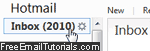 By default, Hotmail will display the "Hotmail Today" screen after you login (you can customize this behavior and have Hotmail directly load your inbox). To view your Hotmail inbox content, simply click on the folder name and number of unread email messages displayed.
Hotmail show on the left the total number of unread email messages in your inbox; on the right, you'll find a listing of the messages it contains. Hotmail doesn't currently allow us to configure the number of messages to display per "screen" of inbox. That setting may be available if you check your Hotmail account from a desktop email program.
Tip: The Hotmail inbox background is darker, indicating the current email folder. The Hotmail theme colors depend on your settings: learn how to change Hotmail theme.
Tip # 2: wherever you are in your Windows Live account, click on the "Hotmail" word at the top of the current page, and you will be redirect to your inbox!
Below your folder listing (bottom left corner), Hotmail displays three buttons that give you one-click access to "Home", "Contacts", and "Calendar". When you are outside your emails, just click on "Hotmail" at the top of the screen (or "Inbox" in the dropdown menu).
How many emails are in your Hotmail inbox?
 The new Hotmail no longer indicates pagination numbers that allow you to figure out how many email messages are currently inside your inbox. To get the total number of messages, plus the size of your inbox, move your mouse cursor above "Folders", click on the "gear" icon button, and choose "Manage folders": that page will give you number of emails and folder size for all your email folders.
Hotmail.com inbox vs. email program inbox
 When you use an email program to check your Hotmail emails, the email program downloads copies of your emails; in each of our tutorials that explains how to setup Hotmail in an desktop email client, we specify that (except for certain Hotmail account setups like IMAP), you should tell the email application to leave copies of your emails on the server. Your Hotmail.com inbox and your local inbox will, then, contain the same emails: and you want to keep your Hotmail.com inbox and local inbox "sync'd" - aside from obvious practical advantages, it allows you to use your live Hotmail account as an "email backup" service of sorts.
Caution: If you did not follow one of our tutorials to setup Hotmail in your email program, be careful that most email clients will automatically *not* leave a copy of your inbox emails on the server. (Note that this remark only applies only if you have setup Hotmail as a POP3 email account.)
That kind of setup (synchronized inboxes) is optimal, since it allows you to check your emails from wherever you are with an internet connection: your Hotmail.com inbox will then have all the emails you saw at home the day before, on your computer (where you checked your Hotmail account from a desktop email program, as opposed to a web browser).
Why "inbox" in "Hotmail inbox"?
 Calling "Hotmail inbox" the folder in which your new Hotmail emails arrive comes from brick-and-mortar office terminology, where many employees have a physical inbox in which papers (things to do or read) are dropped by colleagues and managers. Likewise, your Hotmail inbox collects all emails to read as they arrive (except for spam, which by default bypasses your inbox and goes straight to the junk mail folder).
A desktop email program like Microsoft Outlook also has an "outbox" folder, a temporary location where emails being sent (or "to send", if you are working offline) are stored. Windows Live Hotmail does not have an outbox, but, like Outlook, has a "Sent" folder to keep track of emails you have sent. So, calling the main email folder the "Hotmail inbox" is simply using an easy-to-understand, real-world analogy to describe a more abstract concept.
Since both Hotmail and Yahoo! Mail (among others) emulate online a desktop email application, both follow the tacit convention of calling "inbox" the central folder of your email world. That way, everyone is on the same page, and this makes it easier (more intuitive) to switch between using an email program and a webmail service.
Tip: use the Hotmail inbox link to check for new emails
As covered in our check Hotmail emails tutorial, you can use the Hotmail inbox folder link to check for new emails: instead of refreshing the entire screen, simply click "Inbox" and Hotmail will check the server for new mail messages: this works with other folders (custom and standard), but you rarely want to check the Junk folder for spam, and all other emails arrive directly in your inbox. The same principle applies when you switch folder: if you are in the Drafts folder and go back to your Hotmail inbox, it will automatically be updated if new emails arrived since you last looked at the inbox.
Tip: The new Hotmail added a double-arrow "Refresh" button - click it to download any new messages to your inbox!
Hotmail inbox size, and Hotmail inbox size limit
Shortly after the new Hotmail was launched, the Windows Live Hotmail webmail service started including the "ever-growing storage" feature ("A feature of Windows Live Hotmail that increases the space available for your e-mail as you need it", straight from Hotmail Help) which expands as needed - without a Hotmail inbox size limit any longer: this is one aspect of the service where Hotmail Plus (the premium, paid version of Hotmail) no longer trumps the free Hotmail, since -although Hotmail Plus starts with a 10Gb inbox size- both versions of the webmail service will increase the capacity of your inbox as needed.
As far as your Hotmail.com inbox size is concerned: the old Hotmail used to give you your current storage usage (including inbox and other email folders). Because of the new "ever-growing storage" feature, Hotmail no longer shows the space used by messages. To the get size and number of emails inside your inbox after setting up Hotmail in Windows Live Mail (messages stored on your computer hard drive), hover your mouse cursor above "Inbox":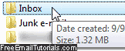
Tip: from a web browser, move your mouse above "Folders", click on the Gear button, and select "Manage folders" to get the size of any email folder in your Hotmail account!
How to select all emails in your inbox
Your Hotmail inbox is subdivided into screens when it contains over 35 messages: arrows at the bottom of the email listing allow you to navigate through pages of messages in your inbox (or any other Hotmail folder for that matter - the emails displayed depend on the folder you currently have selected on the left).
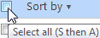 To select all emails currently displayed in your inbox, click on the checkbox at the top of the inbox or current folder: this selects all the emails currently visible. If you have more emails, those that aren't visible will not be selected. But if -unlike us- you keep up with your Hotmail emails and file them as needed, you will rarely see multiple screens of unfiled emails in your inbox! This Select All checkbox, along with searching and sorting emails (covered in a later tutorial), give you powerful tools to manage emails in your Hotmail inbox. (Also, Windows Live Hotmail supports email rules ("email filters") to automatically file your emails based on certain conditions.)
Empty your Hotmail inbox
To delete all emails contained in your inbox (or "empty Hotmail inbox"), you can use the technique in our "Empty a folder" tutorial: the new Hotmail makes this easy; click on the "Sweep" menu, and choose "Empty" this folder from the dropdown menu: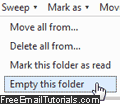
To delete one or more email messages from your inbox, select their checkboxes, and either click on the "Delete" button in the Hotmail toolbar, or choose "Move to > Deleted". The second approach also allows you to quickly file messages from your inbox to another email folder of your choice (including custom folders you created yourself!) Every selected email will disappear from the inbox, and become available under the new destination folder.