Hotmail.com
 Hotmail.com is one of the most popular webmail service in the entire world - in addition to an increasing number of features, the fact that Hotmail.com was one of the very first webmail services also helps: Hotmail launched in 1996, and was only purchased by Microsoft a year later, when Hotmail.com was re-branded "MSN Hotmail". Today, the webmail service is officially called "Windows Live Hotmail", but known and referred to by most users simply as "Hotmail". In spite of a growing number of alternate free and paid webmail services, Hotmail.com remains today as the top free email provider, alongside Yahoo! Mail and Gmail.
Tip: MSN Hotmail and Windows Live Hotmail are the same service. A few years ago, Microsoft created a separate group (the "Windows Live Team") to take care of all products and services, like the Windows Live Mail email program, all free downloads for Windows users.
Hotmail.com appearance and redesign
The classic version of Hotmail had a look and feel optimized for the browsers of the time, and maintained more or less the same appearance until about 2007. Anyone who signed up for a Hotmail.com account will remember the classic blue look the interface sported:
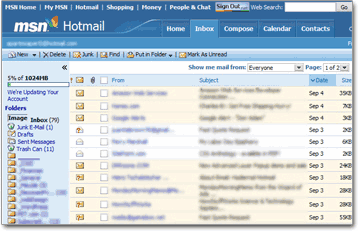
Today's version of Hotmail.com uses a more "pastel" palette, lighter colors, and can be customized with themes. Much of the original functionality remains there, and layers of new features have been added to the mix. Here is a screenshot of the contemporary Hotmail.com: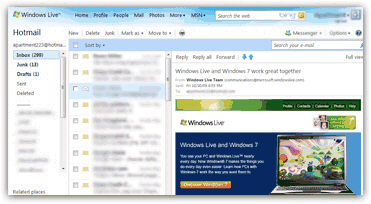
2010 re-design of Hotmail.com
In summer 2010, the Windows Live Hotmail team has released a major upgrade to Hotmail's standard features; the new functionality, however, was accompanied with very few, and minor, interface design changes. For the most part, users will not see any difference between the 2007 redesign and the 2010 updates, which focused on enhanced functionality.
Aside from major redesign milestones, the Windows Live team also adds some functionality or tweaks existing features; for example in 2011, a few menu items were added (hint: move your cursor above links at the top of the screen!)
Windows Live Hotmail 2011 re-design
Throughout 2011, the Windows Live team has been active adding quite a few features to your webmail experience, focusing notably on speed and simplicity; 2011 saw the advent of a new, streamlined interface, and a complete "under-the-hood" overhaul, making Hotmail nearly as responsive as a classic desktop email program.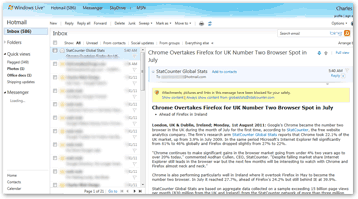
As you can tell from the screenshot above, this is not as big a departure from the previous iteration of your favorite mail service - notice a cleaner layout by default (but you can still add more colors to the experience with Hotmail Themes!)
Hotmail.com features
The 2005 (was not rolled out until 2007, except to early testers) redesign of Hotmail.com took advantage of the new functionality for which web browsers have added support over the years, and in many respects the new Hotmail.com is closer in experience to a full-fledged email program than the original Hotmail.com, which did not attempt to emulate a desktop email client like Outlook Express or Microsoft Office Outlook.
Hotmail.com now supports drag-and-drop support, so you can simply drag the emails you want into a selected folder, while the original Hotmail.com approach of using checkboxes still works as well. You can now also use Hotmail keyboard shortcuts, the same way you can with a regular desktop email program (again, features added to the new Hotmail to take advantage of modern web browsers).
And the modern Hotmail.com experience can be customized to a level much beyond the basic options and settings you could tweak in the original incarnation of Hotmail. The Windows Live team that maintains and upgrades Hotmail is also the same group of people who bring you an email program designed to work seamlessly with the Hotmail service (and does support other email providers as well).
Get your own Hotmail.com account
The next Hotmail tutorials will guide you through the process of creating a new Hotmail.com email account, the Hotmail sign in process, your Hotmail inbox, etc.
While "Hotmail" and "Hotmail.com" remain in use as a legacy, the official name of the service is now "Windows Live Hotmail", the webmail portion of Windows Live's offerings, and the domain name for Hotmail is now "live.com" - something you can see in your web browser's address bar when you are looking at your Hotmail emails (and you can of course still type Hotmail.com to go check your emails).