How to reply to multiple people (email senders) at once from Yahoo Mail
The previous tutorial explained how you can reply to email messages from your Yahoo Mail account. In this tutorial, you will learn a special case of replying to emails, which is called "Reply to All". This command allows you to send an email reply to multiple people without actually having to type their email address. The reply to all feature is typically used when a group of people talks by email about a common project or topic.
Send your email replied to multiple recipients
This is how you send a reply to several email recipient at once:
- First, opened the email message in question by clicking on it
- After having read the content of the email, instead of just replying to the email, this time click on the dropdown arrow shown on the Reply button itself
- From the menu, choose "Reply to All"
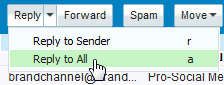
- Yahoo mail will create in your email reply, width in the To field and carbon copy field (Cc) the email addresses of all the people who were included in the original email, as well as the email to sender himself / herself.
- Since you received the email message, clicking on reply to all will automatically include your own email address in the recipients. The only exception to this is when someone included you in the email as a "blind carbon copied" recipient.
- Start composing your answer to that email, and when you're finished, click on the "Send" button; if you were not included yourself in the To or Cc fields of the original email, you can add your own email address in one of the recipient fields (including Bcc)
- Yahoo mail will send your email reply to everyone whose email address was included
This is how reply to all works in yahoo mail: basically it's like using yahoo mail email messages as the chat program with multiple people participating in the conversation. In practical terms, reply-to-all can quickly become overwhelming, since not everyone is always supposed to receive one of the email responses.
But at least you now know how to reply to multiple email recipients at once, without having to manually type all their individual email addresses!
Tip: if you have enabled keyboard shortcut in Yahoo Mail, you can also use the keystroke corresponding to the "Reply to All" command, which is simply "a", when the email is selected.