Free Email Tutorials › Yahoo Mail › Reply to an email message in Yahoo Mail
Reply to an email message in Yahoo Mail
After sending emails, replying to emails you receive is probably one of the things that you'll do most often while using your Yahoo Mail email account. In this tutorial will show you how to reply to an individual email sender, and explain how the process works. The next tutorial will explain the special case in which you're trying to apply to multiple senders.
Reply to an email message in Yahoo Mail
Follow these steps to send a reply to an email you just received:
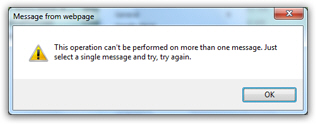
- First, open the email message in question (if multiple emails are selected, you will get an error message - but the next tutorial explains how to reply to multiple people at the same time, ideal to reply to a full distribution list, for example)
- After you've read the email, look at the toolbar displayed near the top of the screen
- Among the series of buttons, notice that the second one reads "Reply", followed by a the dropdown arrow indicating a menu
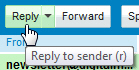
- Click on the Reply button, left of the dropdown arrow
- As soon as you do, Yahoo Mail will create a new email message
- Notice that the "To" field has been automatically pre-populated with the email address of the person who sent to the email. Knowing this means that you can from now on just reply to an email when you're trying to send a message to someone in particular: that steps saves you from having to type in the recipient's email address.
- Another thing to notice, is that yahoo mail also reused this subject (or title) of the email you received. The only change is the prefix that was added at the beginning of the subject line: "Re:" is a standard abbreviation for that lets people know that you are replying to an email.
- If you're replying to an email whose subject line was blank, the only subject line that will be used for your reply is just "Re:". Even if the email sender didn't actually include a subject, is a good idea to specify a subject yourself: that makes it easier to follow the thread of related emails.
- Finally, the body (or "content") of the original email message is also automatically included in your reply. That allows the recipient to see what email you are replying to.
- The blinking cursor is placed at the top: just type your reply
- When you're finished, click on the Send button
You just learned how to reply to an email message in Yahoo Mail!
When should you reply to emails?
Email etiquette is not clear on this, but it is usually accepted that you should only reply to an email if it actually requires an answer. In other words, don't just send an email that says "OK", unless the email sender does expect an answer from you.