Mark a Hotmail email message as spam, and report it as junk mail
Most of the time, spam emails you receive in your Hotmail account are automatically caught, filtered, and placed inside the junk mail folder, instead of remaining inside your Hotmail inbox to clutter it. This allows you to concentrate on legitimate email messages, and not waste time sorting through junk emails to get to your contacts' messages. But what if a spam email is not filtered as junk mail? This tutorial explains how to make sure that these emails are reported, and don't stay in your inbox.
Report an email as spam in Windows Live Hotmail
The next tutorial explains how to report phishing scam emails, where the spammer tries to trick you into revealing personal information and/or sharing your password for sensitive sites (like PayPal, eBay, your bank, etc.) This is a special case of spam.
For "regular" spam emails, follow these steps:
- Go through your inbox emails until you come across a junk email
- When you open it, Hotmail protects you by not displaying pictures (since images can be used to determine whether you read the email or not, and therefore to confirm that your email address is valid, and can be spammed to death).
- Once you have opened an email message that is obviously spam, you can either click on the "Mark as junk" link inside the email headers (see screenshot), or you can go to the "Mark as" menu, and choose "Junk" - both are equivalent.

- Hotmail will then perform several tasks behind the scenes
- First, it will remove the spam email from your inbox and place it inside the Junk folder
- Then, Hotmail's spam filters will report this email as junk mail - if enough people report an email address as spam (Hotmail users or others, since junk mail filtering data is often shared among email service providers), it will no longer reach people's inbox, and instead go straight to their junk mail folder.
- In part because of its huge number of users (at least 300 millions Hotmail users worldwide, by most estimates), Windows Live Hotmail offers one of the best spam and junk mail filtering system around.
Next, learn how to report one or more emails as spam without having to open it / them:
Report junk mail without opening the email
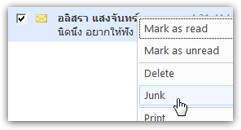 Hotmail also lets you report a spam email as junk mail without requiring you to open the message itself:
When you see that an email is clearly spam (for example when you get emails in a language you don't understand), you can in most cases safely assume that it is junk mail, even without opening the email.
In cases like these, just right-click on the email message, and choose "Junk" from the context menu.
This approach is completely equivalent to the one explained earlier, and the email will be marked as spam, reported to the Windows Live Hotmail team, and moved to your Junk folder.
Tip: Windows Live Hotmail now gives you the choice whether or not to report spam when you mark an email as junk; we recommend that you keep this default option enabled, since it benefits all of us Hotmail users, by allowing the Windows Live team to make their junk mail filters better! For more details: customize Hotmail spam reporting + configure junk mail settings.
Do you need to maintain Hotmail's junk mail filters?
The answer is "No" - Hotmail automatically updates its junk mail filtering system based, in part, on the reports you and millions of other Hotmail users make when they come across junk mail and report it as spam.
This is why it is important to report spam emails when you get them, instead of simply deleting them - obviously, this remark only applies for junk mail inside your inbox, that was not filtered - anything already inside your junk mail folder shows you that Hotmail already knows that these messages are spam!