Hotmail Messenger
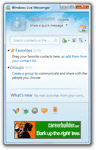 Hotmail Messenger: or "Windows Live Messenger" as it is known. This is a free software download made available by the Windows Live team, the same folks who bring you Windows Live Hotmail. Hotmail Messenger is a free chat client for Windows. Unlike third-party chat applications, Hotmail Messenger fully integrates with Hotmail, your contacts, and your emails. In fact, using Hotmail is much more enjoyable after your Hotmail Messenger download. Having Hotmail Messenger installed on your computer will even notify you of new emails, tell you when your Hotmail contacts go online - but it will also let you mark yourself as "offline" when you need to work. This tutorial will give you a brief introduction to Hotmail Messenger.
Hotmail Messenger Overview
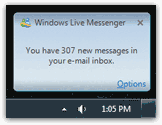 Since Hotmail Messenger is created by the same group that maintains Hotmail, Hotmail Messenger is a great companion software to anyone who uses Hotmail on a regular basis. As mentioned above, a real treat is to be able to see when you receive an email from someone, even if your email program is not currently running in the background. As shown on the screenshot, you get a notification when you first log into Hotmail Messenger that you have {x} new email messages. You also receive individual notification when a new email arrives.
Hotmail Messenger and Windows Live Mail integration
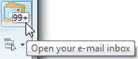 Hotmail Messenger is part of the same software package as Windows Live Mail: here is, on the screenshot, a good example of the kind of integration you get. Barely logged into Hotmail Messenger, you already know that you have unread emails.(In our case, we have more unread emails than the 2 digits Hotmail Messenger's counter displays.)
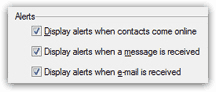 Better still, Hotmail Messenger lets you configure the settings and types of alerts you would like to see; while getting notified of new emails is very practical, it can also be distracting if you heavily use your Hotmail account for emails. Just turn off the alerts, mark your profile as offline, and Hotmail Messenger will just sit there silently, but available when you need it.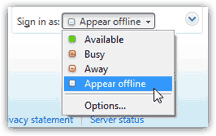
Change your Windows Live Messenger status from Hotmail
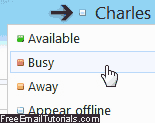 Hotmail now allows you to change your current status right from your web browser, even if Messenger is not currently running. To do that, go to your inbox or any other email folder, and click on your username in the top right corner of the page, as shown on the screenshot. From there, pick an online status - notice that these are exactly the ones available from the Windows Live Mail email program as well (pictured above). Once you familiarize yourself with each color (green for Available, transparent for Offline, etc.) you can just look at your username and tell how you appear to chat buddies.
Ready to download Hotmail Messenger?
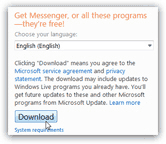 This brief overview of Hotmail Messenger will surely convinced you that this free little piece of software has many perks; our next tutorial will tell you more about the Hotmail Messenger download and installation process!
Hotmail Messenger is one of those tools you quickly get accustomed to, and will have a very hard time living without.