Free Email Tutorials: Apple Mail, Mozilla Mail, Thunderbird, Opera M2, Microsoft Outlook 2003, Outlook Express, The Bat!, WordPerfect Mail
 
Home Email Clients TutorialsEmail Clients Tutorials General Email TutorialsGeneral Email Tutorials Feedback

Hotmail TutorialHotmail Tutorial

Hotmail Tutorial Table of Contents The new Hotmail Hotmail.com Create a Hotmail account Hotmail sign in Reading Your Emails Read your emails Show images and content Downloading attachments Deleting email messages Compose & Send Emails Hotmail email Reply to emails Forward emails Compose a new message Formatting your emails Send attachments File attachment size limits Add pictures to your emails Create a Hotmail signature Sending your email Standard Hotmail Folders The standard folders Hotmail Inbox Hotmail Junk folder Hotmail Drafts folder Hotmail Sent folder Hotmail Deleted folder Custom Hotmail Folders Create a new folder Rename a folder Empty a folder Delete a folder Hotmail Contacts Hotmail Contacts Add a sender as contact Create a new contact Edit contacts' information Delete a contact Configure Hotmail Settings Customize Hotmail Options Hotmail account Change the name displayed with your email address Change your password Retrieve or reset your WL Hotmail password Forward your emails to another email account Skip "Hotmail Today" Hotmail.com in English Hotmail.com en Español Keyboard Shortcuts Delete your Hotmail account Other Products & Services Hotmail Messenger Hotmail Messenger Download Hotmail Plus Hotmail Live Hotmail Kids POP & Mail Server Settings Hotmail POP3 settings Hotmail IMAP Settings Incoming Mail Server Setup Hotmail on your iPhone or iPod touch Hotmail Outlook settings You've reached the daily limit Outlook Connector Hotmail Gmail Hotmail Yahoo!
You are here: Free Email TutorialsHotmail Tutorial › Add a sender to your Hotmail contacts

Windows Live HotmailAdd a sender to your Hotmail contacts

The easiest way to add a new contact to your Windows Live Hotmail account is through email senders. Any time you receive an email, Hotmail lets you quickly add the email sender as a contact. The next tutorial will show you how to create a contact from scratch; yet another tutorial will show you how to import contacts into Hotmail. But as you'll see, creating a contact directly from an email message is by far the easiest way.

Creating a Hotmail Contact from an Email Message

When you select an email in your inbox, or other email folder, the email's "headers" are displayed. Email headers include the sender, the recipient(s), the subject line, etc. Notice that, for emails not flagged as spam, Hotmail shows an "Add contact" link below the From field, containing the name and email address of the sender.
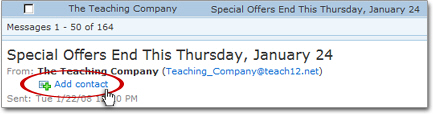
Adding an email sender as Hotmail contact 

Hotmail adds the email sender to your contacts in the background; a discrete message, displayed just below the Hotmail toolbar, confirms that the operation was successful.
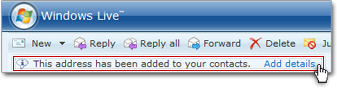
Editing the new contact's details

By clicking the "Add details" link, Hotmail would bring you to the Edit contact details screen; for help on this, please see the editing Hotmail contacts tutorial.
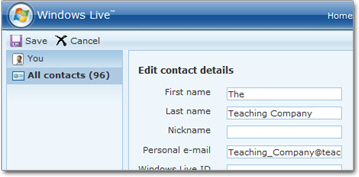
Optionally editing a Hotmail contact's information

The next tutorial will show you how to add someone to your Hotmail contacts even if you have not yet received an email from that person.

Adding new Hotmail contacts "in context"
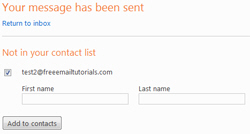
Creating a Hotmail contact from a new email recipient As mentioned earlier, you can also add a new person to your contact list when you receive an email from that person.

Likewise, when you send someone an email for the first time, Hotmail displays a confirmation screen when the email went through; the previous tutorial explains how to add a new contact to your address book in these two scenarios: add recipients as contacts, and create new Hotmail contacts.


As mentioned earlier, you can always add new Hotmail contacts without waiting for an email from the person: please see our Create a new contact tutorial.

The following advertisers help make these free email tutorials possible:
FreeEmailTutorials.com is a comprehensive, ever-growing list of email tutorials and learning resources related to e-mail. You, the viewer, determine the direction this website will take with your questions, comments and suggestions. Site CreditsCopyright © 2009 Free Email Tutorials, All Rights Reserved — Terms of Use | Privacy Policy | Accessibility Statement | Sitemap | Top of Page