Hotmail Incoming Mail Server
 When you are trying to setup your Hotmail account inside an email program or your iPhone / iPod touch, you will need several pieces of information (including incoming and outgoing servers) to allow the device or program to connect to Hotmail's servers.
This tutorial explains what the Hotmail incoming mail server is, how you use it, and what the alternate incoming mail server can be if you use a special email client like Windows Live Mail.
POP3 incoming mail server for Hotmail
The Hotmail incoming mail server is the address of the mail servers on which your Windows Live Hotmail emails are stored, and from where your email program will retrieve your Hotmail emails. When you setup Hotmail in your email application, one of the step it will need is where to connect to download your emails, and this is where the incoming mail server comes in: when asked to enter this address, type in the value "pop3.live.com".
 Note that different email programs call this information in different ways: Microsoft Outlook, for example, calls this the "Incoming Server (POP3)"; Mozilla Thunderbird calls it simply the "Incoming Server"; Windows Live Mail refers to it as both "incoming server" and "incoming mail server"; Mac Mail as "Incoming Mail Server", etc. But all these variants refer to the same thing, and you just need to supply the Hotmail incoming mail server address we listed above. Read on: Windows Live Mail handles this information differently.
Hotmail incoming mail server for Windows Live Mail
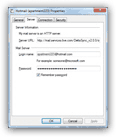
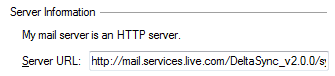 The only exception to that constant is Windows Live Mail, which connects differently to Hotmail.com - unlike other email programs, it will automatically recognize the email address you enter as being a Hotmail.com or Live.com email account, and will configure it internally in a special way, without even using an incoming mail server, strictly speaking.
As we showed on the screenshot above, the "Server URL" is displayed as an "HTTP Server" (in other words a web page), instead of showing the typical incoming mail server address. This is also why Windows Live Mail is able to connect to Hotmail as an IMAP server (with full support for live email folders), and not just as a POP3 email account as do other email clients connecting to Hotmail at this time. (This may change in the future, since Hotmail is really meant to be used as an IMAP account, where your folders are shared by all email programs connecting to the service - at least this is the most useful configuration).
Back to Hotmail POP3 settings or Hotmail IMAP settings…