Delete an email account from Outlook 2007
 Just as easily as you can create an email account, Outlook 2007 lets you delete email accounts; once you remove an email account, it will be permanently gone from Outlook, at least until you manually add it again. Note that deleting an email account from Outlook 2007 will not remove the emails themselves, or contacts, you may have associated with that account over time. Before showing you how to actually remove an email account, let's start this tutorial by explaining how to prevent some email accounts from receiving emails at all.
Disable an email account from receiving emails
There are two reasons people want to remove an email account from Outlook 2007: either they no longer use it, or they no longer want to receive emails sent to this email address. For this reason, we will show you how to disable an email account from receive emails; you can skip straight to deleting the email account if this is your final decision!
To prevent an email account from receiving emails in Outlook 2007, go to Tools > Options, and click on the Mail Setup tab; then, click on the Send/Receive button: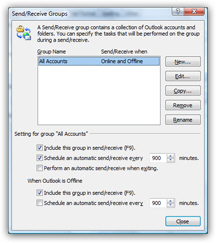 By default, all email accounts send and receive at the same time, and with the same frequency. To customize individual send/receive settings, click on "Edit". Select an email account and uncheck "Receive mail items". Click OK several times: from now on, Outlook 2007 will not check mail for this email account. Let's now show you how to delete that account instead.
Remove an email account from Outlook 2007
To permanently remove an email account from Outlook 2007, go to Tools > Account Settings. The "E-mail" tab is automatically selected, by default, and displays all the email accounts you have ever added in Outlook. Select the email account you want to delete: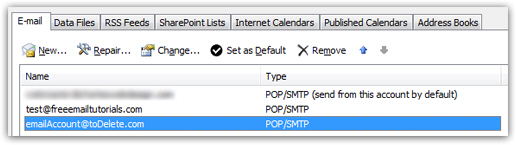 Now click on the Remove button displayed above your email accounts, and Outlook will give you a last chance message: "Are you sure you want to remove the [your-email-account-nickname] account" - click Yes to proceed, or No to keep this email account.
After final confirmation, Outlook 2007 permanently deletes this email account, without deleting messages or contacts associated with it!