Delete contacts from your Yahoo Mail address book
 Just as easily as you can create contacts in your Yahoo Mail address book (contact list), you can delete contacts. In this tutorial, we will show you how to delete a contact, but start alternatives to deleting contacts by dealing with large contact lists using contact categories, or by first exporting the undesirable contacts before removing them from your address book. Since you cannot "un-delete" a contact beyond a month, this topic is worth covering first. We will conclude this tutorial by explaining how to recover a deleted contact (to restore within about 30 days).
Alternatives to deleting a contact in Yahoo Mail
Since deleting a contact cannot be undone in Yahoo Mail, here are two things to consider before permanently removing contacts from your contact list (address book).
First, consider using contact categories: by grouping your contacts into categories, it becomes easier to deal with overflowing address books. This allows you to keep large amounts of contacts, without having to delete any of them: you never know when you'll need to retrieve a contact's information, which cannot be done if he/she has been deleted!
Second, you can follow our tutorial that explains how to backup or export your contacts from Yahoo Mail: by having a copy of your full Yahoo Mail contact list before deleting a contact, or before making any major changes of this type, you will always have a time-stamped address book backup to refer to, in case you need to access an old contact's information.
Let's now show you how to actually delete a contact from your address book.
Delete a contact from your Yahoo Mail address book
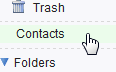 When you are logged in to your Yahoo Mail account, click on the Contacts link displayed in the left pane, below the Trash folder, and above your custom email folders, as shown on the screenshot. Yahoo will open a new, "Contacts" tab inside the browser window, containing all the people currently inside your address book.
 Find the contact you would like to delete, and click on its name to load its profile on the right pane. Click on the Delete button just below the contact's name, category (if any), and icon: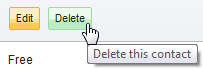
Yahoo Mail gives you a last chance to change your mind, by displaying the following message before actually deleting the contact: ''Are you sure you want to delete [contact-name] from your contacts?" To cancel the contact deletion, click on the Cancel link; to proceed and permanently remove the contact from your address book, click Delete.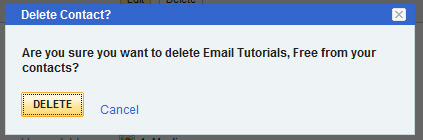
As soon as you click Delete, Yahoo Mail removes the contact from your address book, and displays a "Contact Successfully Deleted" confirmation message. The next section of this tutorial will explain how to restore a recently deleted contact, or on the contrary, ensure that the contact is permanently and immediately deleted (and not store inside the Deleted Contacts category - permanently purge the contact, in other words).
Un-delete or recover a deleted contact in Yahoo Mail
If you paid attention to the confirmation message after deleting your contact, you will have noticed that Yahoo Mail offers deleted contacts a 1-month grace period: keep in mind that the flexible wording implies that your deleted contact may be gone for good before the full month is up (which is why we recommended alternatives to deleting contacts, since you never know how soon you will realize having mistakenly deleted the wrong contact!)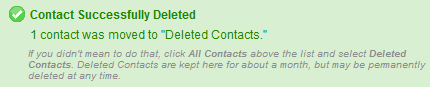
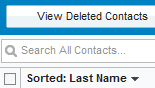
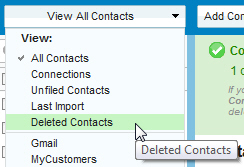 To recover a contact you recently deleted, go to your address book (click on the Contacts link in the left pane). Then, click on the View All Contacts dropdown menu, and choose Deleted Contacts.
Yahoo Mail will retrieve the list of all contacts you have deleted within the past 30 days or so.
Locate the deleted contact you would like to restore to load its profile, the same way you do for contacts which have not been deleted: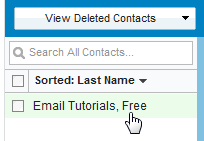
Once the profile has loaded, notice that Yahoo Mail displays a Restore button inside the contact's profile, in addition to the deletion date:
Yahoo Mail will display the Restore Contact? dialog: "Would you like to restore [contact-name] to your Yahoo! Contacts?" Click Cancel to leave the contact in the Deleted Contacts category, or click Restore to bring him/her back to life alongside the other contacts in your address book. Once a contact is successfully restored, Yahoo will give you a confirmation:
Immediately delete a deleted contact
While deleting a contact can be undone within a month or so, deleting an already deleted contact cannot be undone. To immediately delete a deleted contact, without any chance of recovery, click on the Delete Permanently link inside the deleted contact's profile. This will purge right away the profile of this contact from your Yahoo Mail address book.