Set Windows Live Mail as the default email client on Windows (XP/Vista)
This tutorial shows you how to make Windows Live Mail the default email program, or default mail handler, on Windows XP, Windows Vista, and Windows 7. These versions of Windows let you set the default email application from the Control Panel, but the Options dialog in Windows Live Mail lets you do that in a much easier way. Clicking a Make Default button and confirm are the only two steps needed to make it your default email program.
You can also set Windows' default email application from the Control Panel:
• Set the default email program in Windows XP
• Set the default email program in Windows Vista
• Set the default email program in Windows 7
Windows Live Mail auto-checks your default email program settings
By default, Windows Live Mail automatically checks to see if it is currently set as Windows' default email client when it loads. If it is the default email client, nothing happens (visually) - if Windows Live Mail notices that it is not set as the default email program, it will display the following confirmation dialog: "Set Windows Live Mail as your default e-mail program?"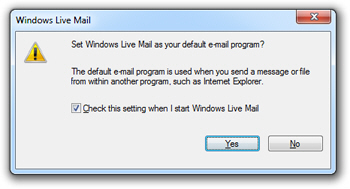
 If you click on the Yes button, Windows Live Mail will become the operating system's default email program instead of whatever application is currently set as that. If you click No, Windows Live Mail will keep your current default mail client settings, and load its main window as if nothing happened.
Prevent Windows Live Mail from checking your default email client settings
Notice the "Check this setting when I start Windows Live Mail" checkbox: by default, Windows Live Mail will always check if it is the default email program. This is a useful feature when another email application is installed on your computer, for example, and automatically sets itself as the default mail handler: next time you open Windows Live Mail, you will realize that this happened, and have a chance to revert to your default email application.
On the other hand, if you find this process tedious, and would rather manually set your default applications through the Control Panel, you can uncheck this checkbox, which instruct Windows Live Mail not to check in the future if it is the default email application or not.
Set Windows Live Mail as default email client on Windows XP/Vista/7
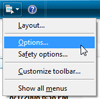 Instead of going through the multi-step process of setting the default email program through Windows' Control Panel, you can do it directly from Windows Live Mail's Options dialog.
Click the Show Menu button, and choose Options; if you see the traditional menus, go to Tools > Options. Both open the Options dialog: under the General tab, which should be selected by default, locate the bottom section, labeled "Default Messaging Program":
If Windows Live Mail is not currently the default email program on Windows, the text next to the first button will read "This application is NOT the default Mail handler". Click the Make Default button, and it will be disabled (grayed out).
This method of setting Windows Live Mail as the default email client through Options works on Windows XP, Windows Vista, and Windows 7. But you can also go through the Control Panel to manually set Windows Live Mail as the default mail handler, which works for any email program recognized as such by Windows (see the two links at the top of this tutorial).
Confirming your change of default email client
The text has now changed to "This application is the default Mail handler". This is a bit misleading, because Windows Live Mail will not become your default email application until you actually have clicked the Ok or Apply button to confirm the change in configuration.
 So click Ok (no need to Apply first), and Windows Live Mail's option dialog will close, integrating your new option choices. It is that easy to make Windows Live Mail your default email program. (If Windows Live Mail was already your default email client, nothing will happen.)
Testing Windows' Default Email Program
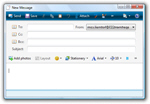 You can double-check that Windows Live Mail has in fact become your default email client by clicking this test email link.
A new, blank email window will open: if it is Windows Live Mail, you have successfully changed it to be your default email program!
In case of problem, you can always set the default email client from the Control Panel on Windows XP, Windows Vista, or Windows 7.