Meet Windows Live Mail
Since Windows 98, Outlook Express came bundled with Windows; Windows Vista bundles a different email program called Windows Mail. Here are a few differences between these two email programs: Outlook Express allows you to check your Hotmail account, while Windows Mail does not. Windows Mail comes with serious junk mail filters and phishing protection capabilities, unlike Outlook Express. Windows Live Mail brings a free, full-featured email program to Windows XP and Windows Vista users, and combines in one package the best that both Outlook Express and Windows Mail have to offer.
Email Program Confusion
We will start by clarifying the confusingly similar names Microsoft gives to its email programs. With the exception of Entourage, Microsoft's email and task management application for Apple Macintosh computers, all email clients are for Windows only.
Outlook Express (Windows 98 through Windows XP) and Windows Mail (Windows Vista) are the free email programs that come included with Windows.
Outlook (also known as "Office Outlook" or "Microsoft Office Outlook") is Microsoft's email application part of the Office productivity suite. The year that follows the program (Outlook 2003, Outlook 2007...) indicates the version.
Windows Live Mail -formerly known as Windows Live Desktop Mail- is the free email client we cover here. "Windows Live Hotmail" is the new name for Hotmail, and refers to Microsoft's free "webmail" service (where you read and compose emails from a web browser like Internet Explorer).
Windows Live Mail Features
Windows Live Mail includes spam protection and security features, only many of them only available in Office Outlook until recently. By default, for example, Windows Live Mail only displays images in emails from your contacts, blocks JavaScript execution, or on a per-email basis (in the spam world, images can be used to determine if your email account is active or not). It also includes impressive anti-phishing protection: fake emails ("spoof emails", or "scams") from PayPal or banks are nearly always caught.
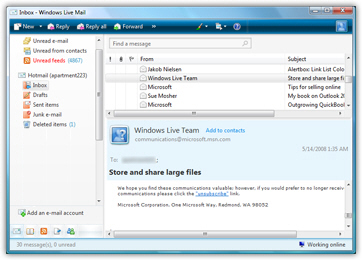
Windows Live Mail also lets you read RSS feeds: the feeds are the ones you subscribed to in Internet Explorer 7, and any RSS feed you manually added from within Windows Live Mail (what are RSS feeds?). Your RSS feeds are presented much like emails are, which makes reading, forwarding, or deleting news items very intuitive.
Finally, Windows Live Mail lets you check emails from your Hotmail account. Since June 2008, Hotmail can no longer be checked from Outlook Express. (Hotmail emails could never be checked from Windows Mail.)