How to unsubscribe from mailing lists (newsletters) in Hotmail
The new Hotmail introduced a handy feature when it comes to managing newsletter subscriptions; since the CAN-SPAM Act was passed into law, all email marketing mailing lists must include an unsubscribe link somewhere in the email, typically in the footer. But, while complying with the law, the process is not always made easy: thankfully, Hotmail now includes a "universal un-subscription" mechanism of sort, which lets you get rid of invasive newsletters with a single click. This tutorial explains how to unsubscribe from a newsletter using this Hotmail feature (available when you check Hotmail from a web browser).
Universal-unsubscribe with Hotmail
Note that some email marketing newsletters / mailing lists may not be recognized by Hotmail, in which case you would need to manually unsubscribe from those mailing lists.
Follow these steps to unsubscribe from a newsletter:
- Load / open the email newsletter in question inside your Hotmail inbox
- When the newsletter has opened, look at the email headers (From, To, Date, Subject line, etc.) near the top of the message.
- If the universal-unsubscribe feature is supported for that mailing list, you will see a "You're subscribed to this mailing list" message, followed by an Unsubscribe link:
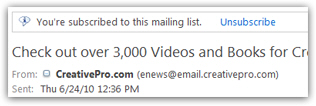
- To remove yourself (your email address) from this mailing list, just click on the blue "Unsubscribe" link (as shown on the screenshot).
- After a second or so, Hotmail will display a confirmation message that your unsubscribe request has been forwarded to the mailing list management system: "We've asked the sender to remove you from this mailing list"

- In most cases, this really means that you have been removed from that mailing list, though you may receive an email with a link confirmation from the newsletter senders, to confirm your request to unsubscribe.
If Hotmail displays the Unsubscribe link, it means that it has recognized that this newsletter is handled by one of the most common mailing list management software, with whose un-subscription mechanism the Windows Live team is familiar.
What if I cannot remove my email address from a mailing list?
If automatically unsubscribing through Hotmail, and manually removing your subscription did not work, the next step is to mark the email as spam: some companies make it intentionally difficult to unsubscribe, if not outright impossible. In this cases, reporting these newsletters as junk mail will automatically go to the Junk mail folder, no longer clutter your Hotmail inbox.
After a company notices that its emails are filtered as junk mail increases the chance that they'll correct their behavior and allow for an easy opt-in and opt-out subscription system.