Hotmail Drafts Folder
Windows Live Hotmail's Drafts folder is used by Hotmail to store any unsent email you have saved. These emails are store inside the Drafts folder until they are either deleted, or sent - which case they are, by default, moved to Hotmail's Deleted or Sent folder.
Using Hotmail's Drafts Folder
Any time you compose an email from your Windows Live Hotmail account, the new email toolbar displays a series of button: clicking the second button, "Save draft", will leave the email window open, but save a copy of your email, as it currently is, in the Drafts folder.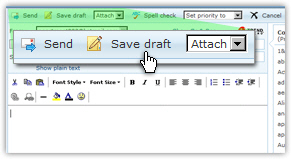
Hotmail's Drafts folder works exactly the same way as Outlook Express, Windows Mail, or Office Outlook's Drafts folder does: any unsent email that is saved is stored in it. As soon as this email is sent, it will be removed from the Drafts folder. By default, emails are saved in the Sent folder (or "Sent Items", for Microsoft email programs) as soon as they are sent.
Editing Previously Saved Emails
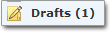 This screenshot of Hotmail's Drafts folder shows the folder name in bold letters, followed by a bracket-enclosed number. In Hotmail, a bold folder name indicates that the folder contains unread emails; the number between brackets indicate how many unread emails the folder contains.
In the case of the Drafts folder, the notion of "unread" is not relevant - since these are unsent and "un-received" emails. Rather, Hotmail uses this convention to tell you how many emails there are altogether in the Drafts folder: in other words, how many emails you have started writing, but have not yet sent.
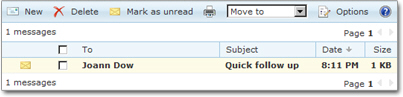
Clicking on the Drafts label or icon will reveal the folder's content. To edit a previously saved email, just click on it. To delete it, select it, and click the Delete button. The Drafts folder displays a Date column, which indicates when the email was last saved.
Hotmail's "Auto-save" Suggestion
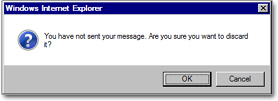
If, while editing or composing an email, you navigate away from the email window (by pressing the back button, going to an email folder...), Hotmail will display a confirmation message and give you a chance to save your in-progress email as draft.