Rename a folder in Hotmail
With the exception of Hotmail's five standard folders, any folder you created in your Hotmail account can be renamed. This tutorial will show you how to rename a folder straight from Windows Live Hotmail, or from an email program you might be using to connect to your Hotmail account. Our example will use the Windows Live Mail email program, but the procedure is the same in Outlook Express and Office Outlook.
Renaming a Hotmail Folder
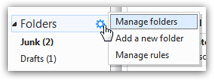 Updated for the new Hotmail: renaming one of your email folders now takes a bit more time, but is just as easy. Instead of right-clicking to rename, you need to move your cursor above "Folders", left click on the gear button that appears, and choose "Manage Folders" from the menu.
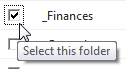 Windows Live Hotmail will load your Folders screen, where all standard and custom email folders are displayed: select the checkbox corresponding to the folder you want to rename; then, click on the "Rename" link displayed at the top of the folder listing.
Hotmail opens a new page that shows the old (current) folder name, and gives you a text input to type and change the name of the folder (the "Folder name" text field).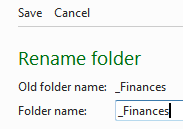
Type the name you want to rename your email folder to, and click on the "Save" button; you will be brought back to the folder listing screen - just click on "Inbox" to return to your emails, and notice that Hotmail has changed your folder's name!
Rename folders in the old Hotmail
This portion of the tutorial no longer works in the new Hotmail; but, if enough of us email the Windows Live team that we want it back, maybe they will add back this very practical "right-click-to-rename" functionality for custom email folders:
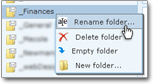 Hotmail lets you rename folders right from a web browser (like Internet Explorer); start by locating the folder you would like to rename. Right-click on the folder to display the folder's "context menu": then click Rename, the first menu item. The folder name will become selected, editable text as soon as you do.
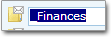 Simply type your new folder name over the selected text of the old folder name; once you have chosen the new folder name, hit the Enter key. The folder will probably switch position: this is because Hotmail moved the renamed folder to its new location, based on alphabetical order.
Renamed email folders are automatically synchronized
If you use Hotmail from both a web browser and an email client, the folder will be automatically renamed in your email program as well; the Windows Live Hotmail service takes care of automatically synchronizing your information from wherever you access it. The next section will show you how to rename a Hotmail folder from an email program.
And that's all it takes to rename folders in the new Hotmail!
Renaming a Hotmail Folder Through Your Email Program
Since Hotmail maintains your data synchronized between the web and email programs, you can also rename folders right from your email application. We demonstrate folder renaming in Windows Live Mail, but the procedure is identical in Outlook Express and Office Outlook.
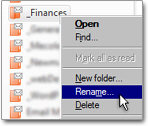 Right-click on the folder you would like to rename, and choose from the context menu. A input dialog box will open, allowing you to type a new folder name, much like you did in your web browser: type the new folder name, and hit the Enter key to validate your choice.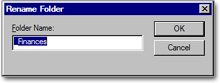
Windows Live Mail (or the other email program you used) will automatically tell the Windows Live Hotmail service about the new folder name; next time you log on to your Hotmail account from another location, the folder name change will be reflected.