Windows Mail Help
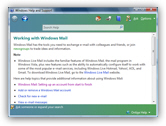 Windows Mail Help: built into Windows Vista as it is, Windows Mail comes fully integrated with the Windows help system. Unlike the previous help files ("CHM" or "HLP") that came with earlier programs (email clients and other applications), the Windows Mail help system is maintained through Windows update, and also integrated with online resources Microsoft makes available on their website. This tutorial will show you how to load and use the integrated Windows Mail help system.
Access Windows Mail Help
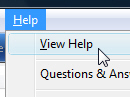 You can access the Windows Mail help system whenever Windows Mail is running: simply go to the Help menu, and choose View Help: this will launch the Windows Help and Support program, which is like a website navigator pre-installed in Windows Vista.
Another, even faster way, to load Windows Mail Help is to use a keyboard shortcut: hit F1 on your keyboard, and Windows Help and Support will automatically open. (As a useful tip: the vast majority of Windows applications recognize the Help keyboard shortcut of F1.)
Note that when the Windows Help and Support window opens, it knows from which application or context it was called, and will automatically display the appropriate content (which in our case is the Windows Mail help homepage). Example: if you hold down the Windows logo key on your keyboard while pressing F1, it will load the general Windows help homepage.
The Windows Mail integrated Help system
This is what the Windows Mail help system looks like: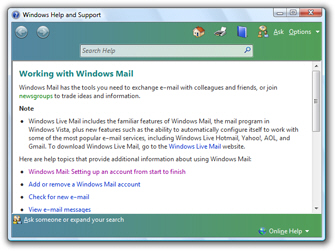
You probably have already seen it if you have been using Windows Vista for any length of time. All Windows components and built-in applications use this integrated help system.
Using Windows Mail Help
 To get Windows Mail help, simply look at each of the links which represent some of the most questions and answers about Windows Mail. Click on any of them, and a new Windows Mail topic loads in a new page.
Just like when you use a web browser (e.g. Internet Explorer), you can go back to previous page using the Back or Forward buttons located in the top left corner of the Windows Help and Support window.
Extending Windows Mail help with searches and online communities
But the built-in information you get on Windows Mail doesn't stop there: notice the Search Help text field near the top of the window: simply type in a question, and hit Enter. The integrated help system will search the entire content of Windows Mail help. If it does not find the answer to your question, you will have the option to get help with Windows Mail from other sources, including online help from the Microsoft website: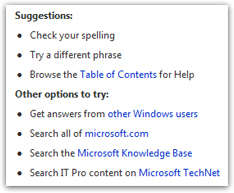
With our own Windows Mail tutorial, the built-in Windows Mail help system, and the Microsoft websites, you should not have many unanswered questions for long!
To learn more about the operating system itself, please visit our Windows Vista tutorial in a new window.