Windows Mail
After nearly a decade, Outlook Express has been replaced by Windows Mail. It is in many respects quite similar to its predecessor; in fact, most Outlook Express users will effortlessly switch to it; the most important upgrade is the addition of spam handling features like junk mail filters, blocked senders, and a built-in phishing reporting mechanism, and an interface redesign. In addition to security, a notable focus of Microsoft's new operating system, Windows Vista, Windows Mail introduces two perhaps overdue features that lacked in Outlook Express: smart junk mail filtering and support for RSS feeds (What are RSS feeds?).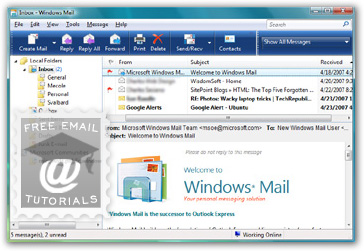
 To open Windows Mail, click on the start menu, then on All Programs, and click the Windows Mail icon to launch the program. (If you are using the Vista start menu (as opposed to the classic start menu), you can simply start typing "Windows Mail", and you will see the clickable Windows Mail icon appear at the top, before you are even done typing.) When you first use Windows Vista, and it hasn't been customize, both Internet Explorer and Windows Mail should be pinned to the top of the start menu.
Side info: since Windows 7 came without any email program bundled, most of its users ended up using Windows Live Mail, a free email program, also by Microsoft, but not really its successor. Anyone using Windows XP, Vista, or Windows 7 can freely download Windows Live Mail, unlike Outlook Express and Windows Mail, which come part of the operating system. The next operating system from Microsoft will resume the standard practice of bundling a free email client as part of Windows, by introducing "Windows 8 Mail" - completely redesigned and simplified, using the "Metro" UI.
New email storage options
One of the issues that often arose with prolonged and/or intense usage of Outlook Express was file corruption, since all messages were contained into a single database file. Windows Mail changes that, by storing data into different files, following your email folder hierarchy.
Where are your Windows Mail messages stored? Type the location of this storage folder inside the start menu, or paste it inside the address bar in Windows Explorer:%USERPROFILE%\AppData\Local\Microsoft\Windows Mail\
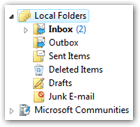
This contains your entire profile; to view your email files, double-click on "Local Folders". You'll see Windows folders follow your locally created email folders in Windows Mail; each of them contains individual messages as ".eml" files. In addition to greater stability, this also means that Windows Search will be able to index your emails as regular files: type keywords you know are in a recent message inside the start menu or Windows Explorer's search box (top right corner), and you will be able to find it (and open it!) right from the start menu / in the search folder.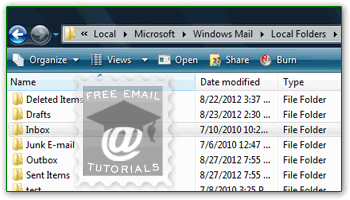
Outlook Express Contacts vs. Windows Mail Contacts
Unlike Outlook Express, which hosted its own "closed" address book, Windows Mail integrates with "Windows Contacts": this means that contacts you create from other applications, and those added from within Windows Mail, will be accessible from any program. Tip: to access your them from Windows Mail, go to Tools > Windows Contacts, or press the equivalent Ctrl+Shift+C keyboard shortcut. From anywhere else in Windows, type "contact" in the start menu and hit Enter: they will open in a Windows Explorer folder.
Why Introduce Windows Mail in Windows Vista?
 You may wonder why Microsoft would go through the trouble of renaming the most popular email application in the world, used by millions.
Well, it looks like many consumers were confused between Microsoft Outlook, the $100 email client part of the Office productivity suite, and Outlook Express, the free email program that comes bundled with Windows itself. The two programs' official names are now Microsoft Office Outlook and Windows Mail.
Basic Differences Between Microsoft Outlook and Windows Mail
Both email programs are made by Microsoft Corp. But Windows Mail comes bundled (free) with Windows Vista, like Outlook Express did with previous versions of Windows. You must purchase Microsoft Outlook however, standalone or part of a Microsoft Office package.
 Microsoft Outlook handles multiple facets of your digital life, and is more geared towards business users. In addition to email, Outlook features a robust calendar and task manager; Outlook 2007 also introduces support for RSS feeds. Outlook is also optimized to work with Microsoft Exchange, a powerful business email server software.
Windows Mail only handles emails and newsgroup subscriptions; it is designed with home users in mind, and is overall more user-friendly (read "less complicated") than Outlook.
In sum, the differences between Windows Mail and Microsoft Outlook are the same we found in the past between Outlook Express and Microsoft Outlook.
Here is the bottom line: if you can spare a hundred dollars, Outlook will offer much more, and make organizing your life a lot easier. Windows Mail will be best suited for exchanging emails and pictures with your friends and family, or for small and home-based businesses.