Make Windows Mail the default email program in Windows Vista
 Since Windows Mail ships bundled with Windows Vista, it is automatically set as the default email program. But if you manually install another email client on your computer, or if an email program comes bundled with an Internet suite of some kind, another program may have been set as the default mail handler instead. In this tutorial, we'll show you how to change your default email program back to Windows Mail; this is something you can do either from within Windows Mail, or through the Vista's Control Panel.
Tip: to pick another default email program through the control panel, see this tutorial: change default email client in Windows Vista.
Set Windows Mail as default email client
Follow these steps to make Windows Mail the default from within itself - this is the easiest option, we'll tell you about the other, and when it might be needed, in the next section.
- Start by opening Windows Mail, and click on the Tools menu: select "Options".
- In the dialog that opened, make sure that the General tab is selected.
- Look at "Default Messaging Programs", at the bottom of the tab: if Windows Mail is not currently the default email program, the first "Make Default" button will be enabled (clickable) - only pay attention to the button next to "This application is [not] the default mail handler"). If that button is disabled (grayed out), Windows Mail is already the default email client on your PC, as is the case in the screenshot below:
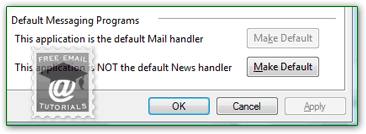 Note: if the first "Make Default" button is grayed out, as it is on the screenshot, but Windows Mail still doesn't open email links on web pages, skip to the next section - set the default from Vista.
 - Click the "Make Default" button: Vista will ask you to confirm this action. Once you have, Windows Mail has now become the default email program on your computer.
- This means that, for example, when you see an email a link on a web page, clicking it will automatically open a new email window in Windows Mail. You can test right now to confirm that Windows Mail is indeed the default email client:
- Click this email link to test your new setting: a new email window will open in your default email program. If it wasn't Windows Mail, read the next section.
Side info: sometimes, simply installing another email program on your computer will automatically make it the default. If this happens, simply go through these steps once more. If you don't install anything, Windows Mail will remain the default without any issues.
Set the default mail handler from Vista's Control Panel
Depending on some settings, what programs were running in the background (etc.), Windows Mail may "say" that it is the default email application, but you still have another email program open when you click an email link. If this is the case, manually set Windows Mail as the default (or confirm that it is), using the Windows Vista Control Panel.
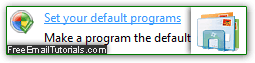
Click Control Panel in the start menu; type "default" in the search field (in the top right corner of the Control Panel window). Don't click on the "Change default e-mail program" link, that approach is too confusing. Click "Set your default programs" instead, and select "Windows Mail" on the left of the next screen; click on the big "Set this program as default" button on the right. Click OK to apply, and you can close the Control Panel window: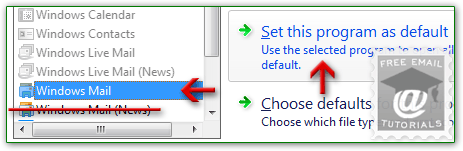 Caveat: some web browsers let you override the OS settings by setting a different program to handle email links in web pages for that browser. If this is the case, check your browser documentation to change the program handling the "
mailto:" protocol.