Spam and Junk Mail in Outlook Express: Blocking Senders
 Unlike its successors (Vista's Windows Mail, and Windows Live Mail Desktop), Outlook Express doesn't come with spam filters. But it does include content-blocking features, and enables you to block email senders. In this tutorial, we will show you how to take advantage of these features.
Blocking Email Senders in Outlook Express
 Anytime you come across unsolicited emails, their sender can be blocked by Outlook Express; unfortunately, the solution is a hardly feasible measure against spammers, who use random email addresses.
The feature nonetheless retains its usefulness in numerous alternate scenarios when trying to block access to your inbox; (persistent ex's and invasive colleagues come to mind).
You can block email senders in Outlook Express in three ways.
Directly Block Email Senders in Outlook Express
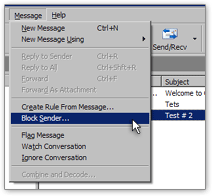 The easiest way to block a sender is to right-click on the email and choose Block Sender from the context menu.
Alternatively, go under the Message menu from Outlook Express' main window, and choose Block Sender….
Either way, the same result is achieved, and Outlook Express will from herein automatically delete all emails coming from the email address in question.
This ban is not permanent, and blocked senders can get a second chance, thanks to Outlook Express' Message Rules manager (Outlook Express considers blocking senders a special kind of email rule).
Blocking senders does not work for all webmail services. The feature is not available for Hotmail accounts in Outlook Express, which processes emails on the server (much like an IMAP-type account)
Block Email Senders from Outlook Express' Message Rules Dialog
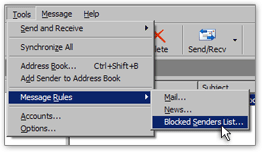 To block email senders from the Manage Rules dialog, go to the Tools menu on Outlook Express' main window, and click Message Rules; from the sub-menu, click Blocked Senders List…
Outlook Express' Manage Rules dialog opens, with the Blocked Senders tab selected.
You will find a list of all email senders that you ever blocked; the list is empty by default.
The blocked senders list lets you:
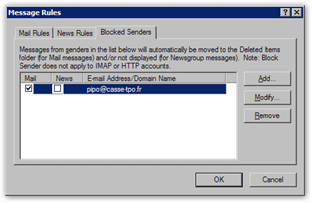 • Remove senders from the list (in effect unblocking them - click the Remove button);
• Manually add email senders or domains to be blocked (by clicking the Add button);
• Edit a given blocked sender's settings (the Modify button).
Unless you wish to modify an existing blocked sender's settings, you will find easier to block senders from Outlook Express' main window easier.
Fighting Spammers Beyond Outlook Express
The ideal combination, in view of Outlook Express' lack of spam filters, is to use a webmail service (like Hotmail) which comes with spam filters which work on the mail server, and place suspicious emails in your junk mail folder before they reach your inbox.
Many web and email hosting companies' offerings include spam-fighting software and/or hardware solutions. We will expand on the topic in our email hosting tutorials.