Email Hosting Tutorial
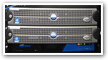 One of the most important decision to make about your organization is its email hosting. Email is quickly becoming a predominant business communication tool, and its reliability, increasingly important. (Pictured left, an email server cluster with Barracuda anti-spam firewall visible below.)
This series of tutorials will explain how email hosting work, and give you the basic knowledge to make an informed choice when selecting an email hosting provider. Themes touched on will include server uptime, vendor reputation, common anti-spam setups (especially) in shared hosting environments, and tips to select a reliable email/web hosting provider.
These tutorials do not focus on hosted webmail service like Hotmail, standard Yahoo!, or Gmail; instead, on actual web and email hosting companies who provide email communication and infrastructure for a domain name of your choice, like Yahoo's "Business Mail", which is in fact an email hosting service.
How Does Email Hosting Work?
In order to be able to send or receive emails, you need an email server (sometimes called "mail server"). Especially in smaller organizations, email servers are bundled with internal or external web servers (which should be avoided, as explained later.)
The term Email Server confusingly refers to two different aspects of email hosting: the email server can refer to the hardware server on which emails are handled in a dedicated email server scenario. Email server also refers to the software used on the server to handle emails, whether a dedicated email server is used, or emails are handled by a server performing another function (like web server.)
The email server is responsible for receiving, distributing or relaying emails. Each mail server on the Internet has a unique location: when you send an email to your friend Alice, "DNS servers" around the world inform webmail services and email servers where they should forward emails for the particular email domain Alice uses ("email@aliceonline.com").
DNS ("Domain Name System") consists of virtual records documenting the physical server of a domain name (like FreeEmailTutorials.com). DNS records are also used to lookup the location of email servers.
Should you use a Microsoft, Apple, or Linux mail server?
For most basic email tasks, either one of the three operating systems will do the job; and you can use any mail server you want (assuming it has a version for the server operating system in question). The operating system you are using yourself on your own computer doesn't matter that much; note though, that using a Microsoft Exchange server will have a smoother integration with Windows PC's, although this mostly affects advanced collaboration functionality, and tends to be adopted by other vendors (think of iPhones and Macs that now fully support working with Exchange servers). What should guide your decision ultimately is both cost of ownership, maintenance, and the return on investment by having your own server in-house, as opposed to having it outsourced to a third-party.
Caution: start by thoroughly researching the common expectations (or laws) for your particular industry; some US defense contractors, for example, have to comply with Department of Defense requirements for secure email exchanges and storage. If you are not in such a case.
Choosing an Email Hosting Provider
 Once you have learned a bit more about web and email hosting throughout these tutorials, we will share online resources that help you choose the ideal email host for your needs.
Host reputation, community feedback, hardware infrastructure, datacenter(s) location and redundancy, and software used all come into play.