Free Email Tutorials: Apple Mail, Mozilla Mail, Thunderbird, Opera M2, Microsoft Outlook 2003, Outlook Express, The Bat!, WordPerfect Mail
 
Home Email Clients TutorialsEmail Clients Tutorials General Email TutorialsGeneral Email Tutorials Feedback

Mozilla Thunderbird TutorialMozilla Thunderbird Tutorial

Thunderbird Tutorial Meet Thunderbird Install Thunderbird Getting Started Setup an Email Account Thunderbird's Interface The Mail Toolbar Sending Emails Receiving Emails The Address Book Export Address Books vCards in Thunderbird Printing from Thunderbird Import In Thunderbird Import Your Settings Import Your Contacts Import Your Old Emails Managing Your Emails Using Folders & Labels Filters in Thunderbird The Search Bar Searching for Emails Spam and Junk Mail Backup and Restore Customizing Thunderbird Your Email Signature Thunderbird Themes Thunderbird Extensions Customize the Toolbars Customize the Address Book Thunderbird's Options General Options Display Options Display Options - Fonts Composition Options Privacy Options Attachments Options Advanced Options "On-The-Fly" Options Local Folders Settings Outgoing Servers (SMTP) Email Accounts Settings General Settings Managing Identities Server Settings Copies and Folders Composition & Addressing Disk Space Settings Return Receipts Security Settings Maintaining Thunderbird General Maintenance Thunderbird Updates Thunderbird Crashes Thunderbird Resources Keyboard Shortcuts Setting Thunderbird as Default Email Client The ThunderTray Utility The Lightning Calendar Thunderbird on the Web Thunderbird News Thunderbird Tutorial Errata
Thunderbird 2 Preview!
You are here: Free Email TutorialsMozilla Thunderbird Tutorial › Importing Emails in Mozilla Thunderbird
Windows, Apple Mac OS X, Linux While this Thunderbird tutorial focuses on Windows, please note that Thunderbird is a "cross-platform" email client: it runs and operates the same way on Windows, Apple's Mac OS X and Linux.
Overview: this free tutorial will show you how to import your old emails into Mozilla Thunderbird from Netscape 4, Qualcomm Eudora, Microsoft Outlook, or Outlook Express.

Importing Emails in Mozilla Thunderbird

If you are switching to Thunderbird from another email application, chances are that you will be able to import emails from other emails clients. Thunderbird 1.5 lets you import emails from Netscape 4, Eudora, Microsoft Outlook, or Outlook Express.

In some cases, Thunderbird will not be able to import from another email client if it is running in the background. Make sure to first close the email program from which you are importing.

Importing Old Emails in Thunderbird
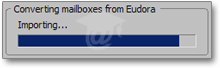
Importing emails in ThunderbirdTo import emails from another email client, go to Tools > Import, and the Import dialog will open. Choose the email program from which you want Thunderbird to import old emails, and click Next.
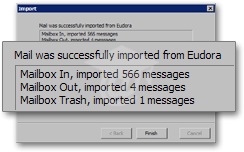
Emails were successfully imported from Eudora to Thunderbird

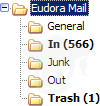
Emails imported from EudoraIn our case, we chose to import emails from Qualcomm's Eudora email software. Thunderbird has automatically created a "Eudora Mail" as a sub-folder of our "Local Folders" folder.

Notice that Thunderbird maintained the hierarchy of Eudora's folders: the sub-folders of Eudora Mail are the folders we have setup in Eudora. Clicking the sub-folders reveals emails as if they had always been in Thunderbird. No glitch, or partial imports; all emails were transferred. That's it.

Performance

Transferring your emails from another email client to Thunderbird is usually a smooth process. However, keep in mind that the speed of the transfer depends on the amount of emails your are importing. Also, note that rich-content emails (that contain text formatting and graphics) are much larger than plain-text emails.

The following advertisers help make these free email tutorials possible:
FreeEmailTutorials.com is a comprehensive, ever-growing list of email tutorials and learning resources related to e-mail. You, the viewer, determine the direction this website will take with your questions, comments and suggestions. Site CreditsCopyright © 2008 Free Email Tutorials, All Rights Reserved — Terms of Use | Privacy Policy | Accessibility Statement | Top of Page