Switch to Classic Theme in Windows 7 or Windows Vista (From Aero Theme)
 Windows Vista and Windows 7 come with the "Windows Aero" theme, which is as beautiful as it is (comparatively) hungry in resources, mainly on the video card (graphics card) inside your computer. One easy way to make Windows faster is simply to switch from the Aero theme to the "Classic Theme", which was the default theme in Windows 2000 and earlier versions of the operating system. Note that while Windows 7 supports the Classic Theme, it does not support the classic start menu (unlike Vista, which does). The advantage of the classic "skin" is its simplicity: what is visually less sophisticated will be much more efficient to render, by the processor (CPU), but mostly the external or integrated graphics card (GPU) - this translates into a more responsive operating system, and in the case of laptops and netbooks, a longer battery life on the road! (Windows 7 Starter only comes with classic and other toned-down themes, since it doesn't support "Aero", graphic-rich themes.)
On this page: Classic Theme in Windows 7 | Classic Theme in Windows Vista
Change the theme to "Windows Classic" in Windows 7
Follow these steps to use the Classic Theme for Windows 7:
- There are two ways to change your theme in Windows 7. The first is to click on the start menu, and type "themes" in the search field. Then, click on the "Change the theme" link that appears in the search results.
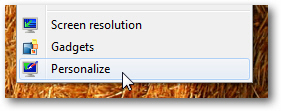
- Another method is to minimize all profile windows to see your desktop, and then right-click on an empty area of the desktop. Now choose "Personalize" from the context menu that appeared, as shown on the screenshot below:
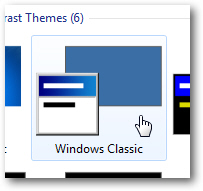
- Either way, Windows 7 will open the Control Panel, with the "Change the visuals and sounds on your computer" screen automatically selected. That screen contains a scrollable listing of all themes currently installed on your computer: scroll down to the very bottom, and you will see an icon labeled "Windows Classic" under the "Basic and High Contrast Themes" section.
- Click on the preview swatch to apply the Classic Theme for Windows 7:
- Windows 7 will apply the change immediately, and the screen may flicker a couple of times. When Windows returns to normal, it will be using the Classic Theme - and you will notice a drastic increase in your PC speed in most cases!
If you get tired of the Classic Theme after a while and want a bit of change, just follow the steps above and switch to another theme.
Change the theme to "Windows Classic" in Windows Vista
And here are the steps to switch to the Classic Theme in Windows Vista:
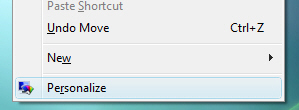
- Right-click on your desktop (not on an icon or file, but on an empty area). From the context menu that opens, choose "Personalize".
- Windows Vista will open the Control Panel, with the "Personalize appearance and sounds" page preloaded. Near the bottom, find and click on the "Theme" link.
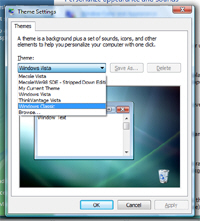
- When Vista opens the "Theme Settings" dialog, you will see a dropdown menu under "Theme", which lists all themes currently available to Windows. Pick "Windows Classic" from the menu, and click on the "Apply" button.
- Within a few seconds, Windows Vista will be visible with the Classic Theme. As with Windows 7, you'll probably notice quite a speed and responsiveness increase on your computer after switching to Windows Classic, which is much leaner in terms of graphics card / GPU resources - that's all it takes to switch back to Classic!
Tip: if you also want to use the classic start menu, just right-click on the start button, and choose "Properties" to customize the start menu options.