Facebook Login
The previous tutorial gave you an overview of Facebook sign in; in this tutorial, we will explain how the Facebook login process works behind the scenes, and how the options you pick in the sign in screen affect if you stay logged in, and how long your account login information will be "remembered" by Facebook, etc. Understanding how Facebook login works helps you keep your account secure, and safe from unauthorized access. As it gained in popularity, and became a juicy target for hackers, Facebook has beefed up its security measures, and there is a lot you can customize to secure your account: to learn all there is to know on the topic (like login history, temporary passwords, etc.) - check out our "Facebook Login Sign in" website.
Facebook Login behind the scenes, step by step
Everything starts with the sign in form; after you have entered your credentials (email address and password), and click on the "Login" button, one of several things will happen:
- The first thing Facebook will do is check your user name and password against its database: if it doesn't match, you will not be able to login, and will be brought back to the sign in form with an error message: the is the easiest Facebook login problem to fix, since you can recover a lost password quite easily.
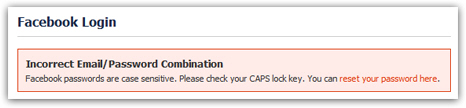
- If the email account / password combination you entered was correct, the Facebook login session will start: you are now inside your account ("logged in" / "signed in").
- If you have checked the "Keep me logged in" checkbox of the sign in form, a successful login will instruct Facebook to keep you signed in, and will do so by creating a "cookie", or small text file", for this particular computer and web browser. The cookie is what makes Facebook automatically log you in when you return, sparing you from having to manually re-enter your user name and password every time you go to
www.facebook.comor try to access another page on the site. - After a certain period of inactivity, Facebook will automatically try to logout, unless a cookie was created to keep your login active.
- If you ever "clear your cookies" (ask your web browser to erase them as part of deleting your browsing history, for example), Facebook will no longer find the cookie, and treat your profile as though you had not requested to stay logged in. But the next time you are trying to login through the sign in form, just check that checkbox again, and Facebook will create a new cookie to keep you logged in.
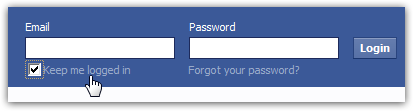
- While this option is convenient and saves you time, it can also work against you if you are try to check your Facebook account from a public computer, a friend's laptop, or other unfamiliar location: do ensure that this checkbox is unchecked.
- A quick way to confirm that you are in fact no longer logged in to your Facebook account is to type www.facebook.com: if you see a blank sign in form, you are logged out; otherwise, you will need to manually sign out by clicking on the "Account" dropdown menu in the top right corner of the page, and choose "Logout". (The next tutorial discusses in more depth the Facebook logout process and precautions to take to remain anonymous when you login, for example.)
Tip: after you have logged out successfully from your Facebook account, someone else trying to access one of the pages you visited (like profile settings) will be required to login - keeping them out of your account, in effect. If the page they are trying to view is a "public page", like another user's profile, for example, they will be able to see that (since viewing a Facebook profile doesn't require to be logged in).