Manually Requesting Read Receipts in Outlook Express
 It is sometimes useful to know whether your email was read by its recipients; unless your email recipient replies, you have to rely on Read Receipts. This feature, built right into Outlook Express, enables you to request to receive a read receipt when the other party reads your email.
 Requesting email read receipts can be done either on a case-by-case basis, manually requesting the receipt for an individual email, or can be automated, to always request read receipts for all emails. Likewise, Outlook Express allows you to configure how it will handle read request receipts for emails you receive from correspondents.
Manually Request Email Read Receipts
The most common way to request read receipts is to request them manually: first you do not need to know if your email was read for all emails; second, it may come across to your email recipients as uselessly "controlling".
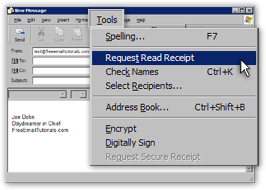 You can manually request a read receipt in Outlook Express from the email window itself.
Go to the email window's Tools menu, and click Request Read Receipt.
A checkmark will now appear left of "Request Read Receipt"; if you change your mind, go once more to Tools > Request Read Receipt, and no read receipt will be requested.
As soon as you send the email, Outlook Express inserts the read receipt request.
It is important to note that read receipt requests are not entirely reliable: your email recipient's may not support the read receipt feature (but all mainstream email applications do nowadays); the recipient may choose not to honor the read receipt, or may have his email program set to automatically refuse acknowledging read receipts.
If you receive a read receipt confirmation, someone did read your email — likely, but not necessarily, the intended recipient. But the absence of read receipt confirmation is inconclusive.