Handling Incoming Read Receipt Requests in Outlook Express
Outlook Express gives you full control over when to send read receipt requests; as we saw, it can automatically send read receipt requests with all your emails, or let you (by default) manually request read receipts, as needed.
 But Outlook Express also gives you full control over how to handle incoming read receipt requests, (i.e. requests sent with emails you receive from others).
Handling Incoming Read Receipts in Outlook Express
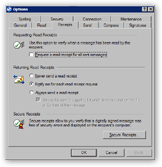 Configuring the way Outlook Express handles incoming read receipt requests can be done from the Options dialog. From Outlook Express' main window, go to the Tools menu, and choose Options.
Select the Receipts tab on Outlook Express' Options dialog.
The middle section, "Returning Read Receipts", determines how Outlook Express will handle incoming read receipt requests.
It offers three options, and a sub-option.
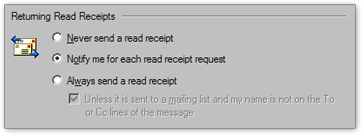
- Never send a read receipt — This choice instructs Outlook Express never to acknowledge that you read an email containing a read receipt request; you will not even know that a read receipt came with the email.
- Notify me for each read receipt request — This is the default option: Outlook Express will tell you that a read receipt request came with the email you are reading, and ask you if you want to send back to the email sender a read receipt confirmation.
- Always send a read receipt — This option allows Outlook Express to automatically send read receipts confirmation to email senders whenever they are requested.
 This last option has a sub-option: "Unless it is sent to a mailing list and my name is not on the To or Cc lines of the message": if checked (it is by default), Outlook Express will not send read receipt confirmations when an email is not directly addressed to you (if a read receipt confirmation was in fact requested).
So How Should You Handle Read Receipt Requests?
There are no significant technical overheads in choosing one option over the other; we prefer, and would recommend, choosing to let Outlook Express put you in control (second option). Few enough email senders request read receipt confirmation, making it feasible to decide whether to honor the request or not on an individual case basis.