Set Outlook Express as default email program on Windows XP
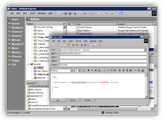 By default, Outlook Express is the only email program that ships with Windows XP; (Outlook Express actually came bundled with Windows since Windows 98.)
Until and unless you install other email applications, Outlook Express should automatically be the default email client.
 To check which application is currently your default email program, click this email link: the default email client will open a blank email window.
 Likewise, when emailing a link or emailing a web page from Internet Explorer, Outlook Express would automatically handle the operation - as long as Windows XP recognizes it as the default mail handler. Internet Explorer itself does not send the command to Outlook Express; rather, it forwards it to Windows, which sends it to your default email program.
Choosing Outlook Express as Default Email Client on Startup
In its default configuration, Outlook Express will automatically check if it currently is Windows' default email program as soon as it starts. If another email application is the default, it will display the following message: Outlook Express is not currently your default mail client. Would you like to make it your default mail client?
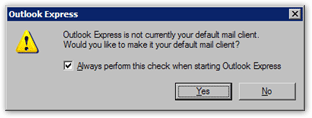
If you answer Yes, Outlook Express has not configured itself to be Windows XP's default mail handler, and you are done! By default, the Always perform this check when starting Outlook Express is enabled: this means that if another email program takes over as default, Outlook Express will display the same message next time you run it.
Set Outlook Express as Default Email Application from the Options
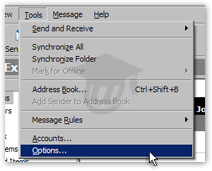 If Outlook Express does not display the dialog above on startup, and it is not currently set as the default mail program, you can do so from the Options dialog.
From Outlook Express' main window, go to the Tools menu, and click on Options.
The Options dialog will open, with the General tab automatically selected.
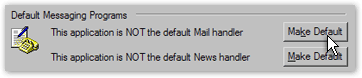
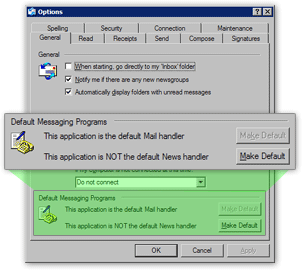 At the bottom of the General options tab, locate the section labeled Default Messaging Programs.
There are two "Make Default" buttons; the top one lets you make Outlook Express Windows' default email program.
(If Outlook Express already is the default email program, the text left of the button will read "This application is the default Mail handler"; the button will not be clickable.)
If the text left of the button reads "This application is NOT the default Mail handler", click on the Make Default button.
Setting the Default Email Program through Windows
Finally, it is also possible to make Outlook Express Windows' default email application by going through the system's Control Panel: see our tutorial on how to set the default email program on Windows XP.