Outlook 2003 and the Microsoft Customer Experience Improvement Program
 At one point or another, you may notice the icon pictured left in Windows' system tray, next to Outlook 2003's icon. It might be visible while Outlook or any other member of the Office 2003 family is running.
This means that you have not yet set your preferences for Microsoft's CEIP, or "Customer Experience Improvement Program". Like many software manufacturers, Microsoft would like to use customers' information to improve their product. But, for privacy concern, it needs to ask your permission first.
Setting Service Options for Office 2003
Start by double-clicking the icon in the system tray. This will open Office 2003's Service Options window.
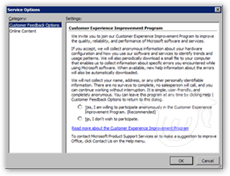 Under the Customer Feedback Options, Microsoft gives you an overview of CEIP.
CEIP is anonymous, in that no personally identifiable data is sent to Microsoft during the reporting process.
The decision to share usage data is ultimately yours, but as a general rule we suggest that anything that allows software makers to improve their products should at least be considered.
Choose whether to participate in the program or not.
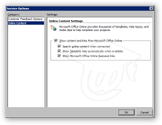 Under the Online Content, Microsoft lets you choose how online resources are to be used in conjunction with Office. Much of the online content applies more to other Office 2003 programs thank Outlook, but it is often useful to connect to Office online.
The online content feature you are very likely to use with Outlook 2003 is the online help. Microsoft Office 2003's online resources are complete and very well made, so that it would be a shame not to take advantage of it.
Once you have set your Office 2003 Service Options for participation, the  icon will disappear from Windows' system tray.
Microsoft's Customer Experience Improvement Program 
Changing your Office 2003 Service Options after the Fact
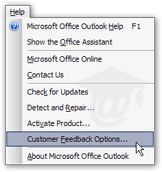
Should you change your mind, and decide to configure differently your Service Options, simply go to Help > Customer Feedback Options, and the Service Options window will pop up.
Note that this can be done from Outlook, as well as all other Office 2003 applications (Word, Excel, PowerPoint…).