How do I send email attachments? (Emailing files and pictures)
 Aside from sending and receiving text emails, that may contain embedded pictures or not*, you will often need to send files attached for your recipients; these files or pictures are called "email attachments". In this tutorial, we will explain what email attachments are, how to send files attached to emails from either a free webmail service like Hotmail, Yahoo Mail, or Gmail, and how to email attachments from full-fledged email programs like Outlook Express, Windows Live Mail, or Outlook.
* Side info: "HTML emails" (richly formatted with the same language as web pages) can contain references to images. The code inside the email calls for an online image to be displayed inside the body of the message, but the message itself doesn't contain any image: this is how you can receive illustrated newsletters that don't show attachments.
Email a file attachment from an email program
 The most common way to send files by email is to attach them to a new message or an email reply. The actual steps needed vary slightly based on which email program or webmail client you are using, but the basic principle is the same: behind the scenes, the technology is identical. When you compose a new email, or write an email reply, you can choose at any point to attach a file through email editor window - here are a few examples from popular applications:
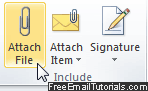
- In Outlook 2007, click on the Insert tab, and choose "Attach File" - you then pick a file, click OK, and the attachment is now part of the email. The readily clickable "Attach File" button in Outlook 2010 is pictured above, visible under the Message tab.
- In Windows Live Mail, you can either click on the Attach button and pick a file, or perform the same action by going to Insert > File as attachment.
- In Thunderbird, click "Attach" to browse to pick a file or picture - same with Outlook Express and Mac Mail, which also include an "Attach" button on their main toolbar.
- Etc. As you can see, attaching files to an email functions the same way regardless of the email program you use, and all follow the same mechanism to, first, browse your computer to locate a file, and then attaching the file to the email.
Note: if you don't see a paperclip icon (universal symbol for email attachments) or some other button like it, the Attach File command often resides under an "Insert" or "Message" menu. In most case, you can also drag a file from a folder on your computer, and drop it above the message window to attach it!
Downside of email attachments
There are mainly two problems with email attachments:
 The first one is size: because each email provider or system administrator can come up with their own restriction on attached file size, to prevent the mail server from running out of space, you never know in advance what your recipients' limit is - if an email is too large, it will bounce back to you with an error message, after you waited for your mail provider to upload its content and try to send it. As a rule of thumb, avoid sending more than 10 megabytes per message unless you've confirmed that larger is ok (to get a file's size on Windows, right-click on it and choose "Properties"; on Mac OS X, right-click on it and choose "Get Info").
Tip: since each email provider sets its own limits when it comes to sending file attachments, you can work around that limitation by sending instead a link to a separately uploaded file.
The second issue boils down to security: to avoid the spread of viruses, most email programs and mail providers will automatically block suspicious attachments. If you try to send a program from your PC (a file that ends in ".exe", ".bat", or script files like ".js" and ".vbs"). If you need to send a program or script file by email, first store it inside a zip file (archive folder). • On Mac OS X, select the file(s) you want, right-click on any of them, and choose "Compress" from the context menu; finder will create a zip file you can drop in your Mail message window.
• On Windows, select your files, right-click on one of them, and choose "Send to > Compressed (zipped) folder" - the wording varies, based on which version of Windows you have (details).
Email attachments and online security - always be careful only to open attached files when (1) you know the email sender and (2) you expected to receive that attachment. With up-to-date anti-virus software, you are relatively safe, but it's even safer not to open attachments from unknown senders, or unexpected attachments!
Send email attachments from a webmail client (online email service)
The way you attach a file from an webmail service like Hotmail, Yahoo Mail, Gmail, AOL Mail, and others - is slightly different. Unlike an email program that will "embed" the file or picture inside your email, as soon as you attached it, the email editor for webmail services will instead upload the file to their server, and then let you send your email. From your end, and the email recipient's end, it makes little difference. If you are trying to send large files as attachments, it would be a good idea to start uploading the file or files, and while the upload is in progress, start typing your email in Notepad (or another text editor), and then paste your email content (text) inside the email editor when the attachment upload has completed. Increasingly often, the file upload will actually happen behind the scenes, allowing you to keep composing your email message in the meantime.