Get news updates by email with Google Alerts
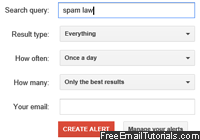 Do you want to get automatic email alerts for topics and news of your choice? This is very easy to do with "Google Alerts", a free service that lets you receive email updates for topics of your choice. In this tutorial, we will explain how to sign up for a Google alert, how to set it up properly to avoid an overflow of irrelevant information, and how to cancel a Google alert after a while. These don't have to deal with email: any topic will do, and will come from Google's continuous indexing of the web (an automated piece of software called "Googlebot" crawls the internet all the time in search of new, updated, or deleted content to ensure that the search engine delivers the most accurate and up-to-date results - with alerts, you'll receive in your inbox the crawler's latest finds!)
Tip: Google doesn't currently allow you to create alerts for custom email addresses - only those "registered" with the company. To get around that limitation, simply visit the website (steps explained below) using the anonymous browsing function of your web browser - in that case, you can manually type any email address you want!
Sign up for a Google Alert
To sign up for an Google alert, follow these simple steps:
- Go to Google.com/alerts
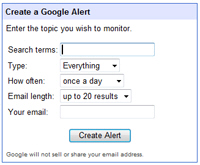
- You will see a simple form that includes a few fields: (the email address field is a text box when you visit that site while logged out of Google - otherwise, you'll see a dropdown menu that lets you pick any email address you've registered with Google).
 Note: if you select "Feed" from the dropdown (vs. an email address), Google will add these updates to your Google Reader account, as an RSS feed, updated behind the scenes (what is RSS?).
 - Under the "Search terms" field, type the words for which you would like to be notified. If you want to receive news alerts for the term "John Doe", use double-quotes: this informs Google that you are interested only in news alerts for the exact expression "John Doe", not for pages that contain each word, but not in this order:

And you can explicitly exclude terms with a minus sign: if you are interested in articles that mention John Doe, but not "Susan", you would type ["john doe" -susan] (this is not case-sensitive). - Under "Type", pick your preference: "Everything", "News", "Blogs", "Videos", or "Discussions". In many cases, choosing "News" will be the best choice, which spares you from third-party bloggers re-hashing main content from news outlets. (Which may be interesting, but gives you plenty of duplicate news alerts in your email digest.)
- The "How often" dropdown menu lets you choose between "as-it-happens" (near real time updates), "once a day" (useful to avoid inbox clutter), and "once a week" (which may not be feasible if you need truly regular email updates on a topic or situation).
- Under "Email length", you can specify how many link results you will receive in your email: currently, the choices are either "up to 20 results" or "up to 50 results". In most cases, we found that up-to-20 is plenty; besides, many non-mainstream topics (in daily email batches) will not even generate 20 links.
- Finally, under "Your email", Google collects the email address at which you will receive your news alerts; either type an email address or pick one from the drop down (see tip below to type an email of your choice).
Tip: Google automatically gives you a dropdown of the email address is has for you; but if you want to sign up for a Google alert using a different email address, you can: just sign out of Google, and the "Your email" will then be a free form text field.
Google will send you a confirmation email: click on the confirmation link, and your Google alert is now active! You should receive your first new update within at most a few days.
Cancel a email update Google alert
Once you no longer want to receive email updates for news through Google alerts, you can very easily "unsubscribe" from the news alert by canceling it:
- Open an email containing that news alert
- Scroll to the bottom
- Click on the "Remove this alert" link:

And this is it: you will no longer receive this email Google alert in your inbox.